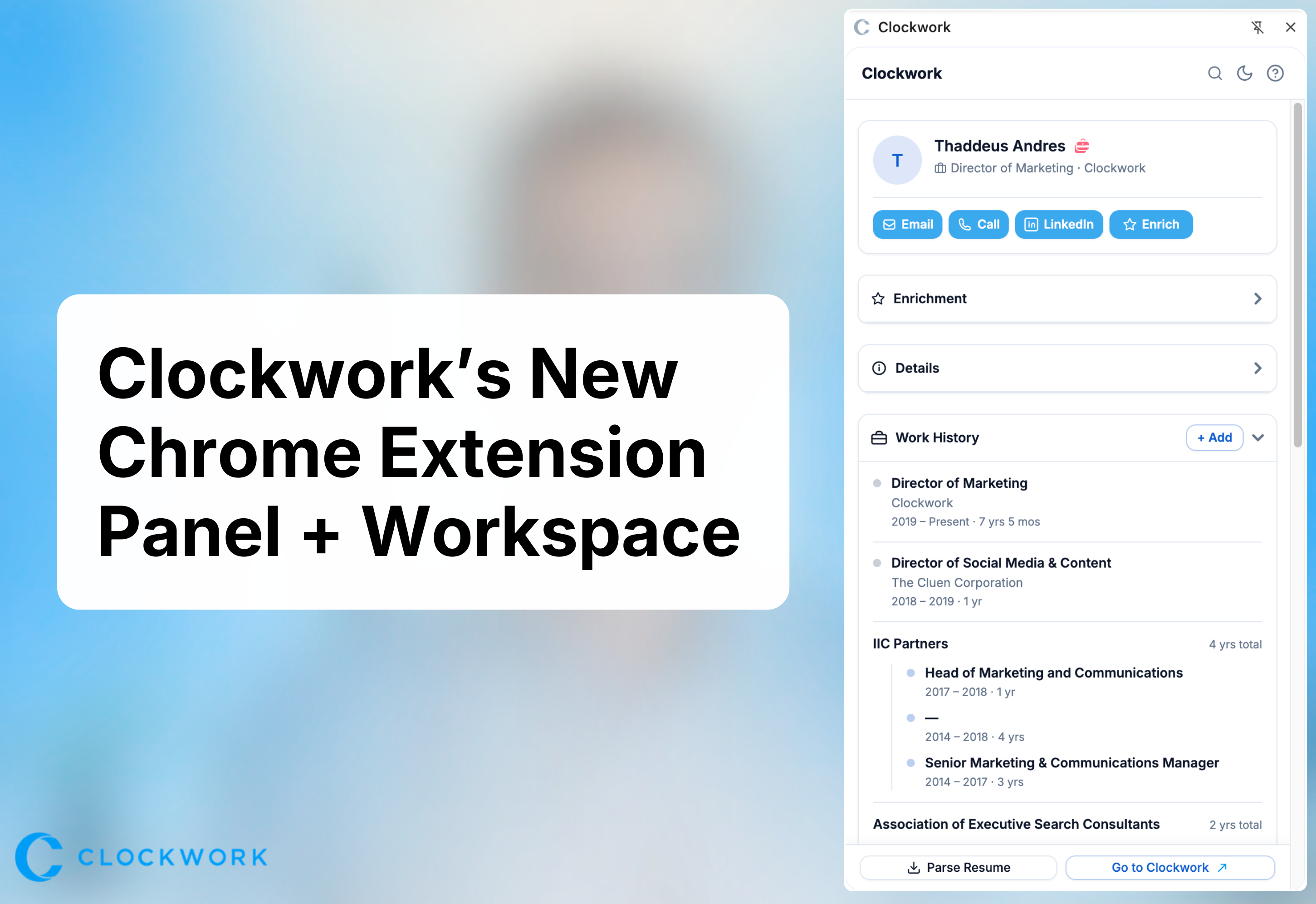
Introducing the New Chrome Extension Side Panel
We recently released a new version of the Clockwork Chrome Extension Panel —featuring a redesigned side panel that brings a faster, more seamless way to capture, enrich, and manage candidate data directly from your browser.
This new experience shifts from a pop-up extension to a persistent side panel, enabling a true split-screen workflow. Executive recruiters can now review, manage and create candidate profiles while simultaneously sourcing across professional networks.
What’s New in the Chrome Panel
1. Persistent Split-Screen Workflow
The new side panel stays open as you browse from page to page and tab to tab. Automatically updating based on the profile you’re viewing. This allows recruiters to move fluidly between candidates while keeping their workflow uninterrupted.
Why it matters:
Less toggling between tools means faster research, smoother workflows, and more efficient candidate evaluation.
2. One-Click Candidate Creation & Project Assignment
Users can instantly add candidates to the database or assign them to projects directly from the panel—whether from a live profile or by pasting in a LinkedIn URL.
Why it matters:
Speeds up early-stage sourcing and reduces manual data entry, helping you build longlists faster.
3. Real-Time Data Enrichment + “Deep Scan”
The extension pulls candidate data through trusted data providers (such as CoreSignal), enriching profiles with publicly available information.
A new Deep Scan feature runs additional enrichment across multiple data sources to fill in missing details and refresh outdated records.
Why it matters:
Gives you more complete, up-to-date candidate profiles without extra research time—improving data quality across your searches.
4. Candidate Management in the Panel
Recruiters can now manage key candidate details without leaving the browser or tab, including:
- Work history (with editable entries)
- Notes and activity history
- Tags
- Project
- Candidate Status
- Contact details
Why it matters:
Turns the extension into a true workflow game changer—not just a contact import tool—so you can take action immediately while reviewing and researching candidates on the fly.
5. Dynamic Profile Refresh & History Tracking
The panel alerts you when a candidate record is outdated and allows you to re-enrich it instantly. It also maintains a history of enrichment activity.
Why it matters:
Ensures your database stays fresh and relevant over time—critical for long-running executive searches.
6. Flexible Data Capture and Lookup (Including Resume Parsing)
In addition to profile-based sourcing, users can:
- Paste LinkedIn URLs to create records
- Parse resumes directly into the panel to extract candidate information
- Manually enhance records with additional data
- Search for candidates and people in Clockwork and open their record in the panel to edit / update
Why it matters:
Supports multiple sourcing workflows beyond LinkedIn, making the tool more versatile for real-world recruiting.
Built for Compliance: Not a Screen Scraper
It’s important to note that our Chrome Extension does not use screen scraping.
Instead, all data is sourced through approved data providers and public APIs, ensuring compliance with platform policies and evolving data regulations.
Why it matters:
This protects your firm from legal compliance risks while ensuring a sustainable, reliable data strategy.
The Bigger Impact: Faster Searches, Better Outcomes
This update is designed to do more than improve usability—it directly impacts search performance.
By combining:
- Faster candidate capture
- Automated enrichment
- In-context workflow management
…recruiters can significantly reduce time spent on manual research and admin work.
The result:
- Shorter search cycles
- Fewer days to placement (DTP)
- Higher placement rates
What to expect:
As part of this update:
- The existing “C” tab that appears on the right side of the page when are viewing a profile will be retired.
- The new panel will instead open directly from your Chrome Extensions menu in Chrome and remain open as you switch tabs
- Existing users who currently have the Chrome Extension installed will automatically see the new panel once released
- You can install the new Clockwork Chrome Panel from the Chrome store as well.
To watch a step-by-step video, visit our support articles here.